世界中送料無料

Stars In Hands
初回注文が33%オフ | 今すぐ購入 →

カート

カートに商品がありません。

Design Guide

How to Design a Memory Poster: 12 Photo Collage Ideas That Actually Look Good

A practical guide to designing a memory poster that doesn't feel like a 2008 scrapbook page — photo selection, layout grids, font pairing, and what to write underneath.

11 min read
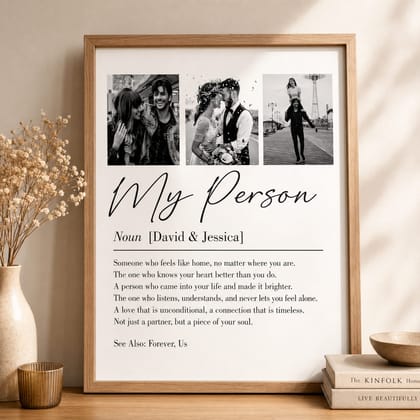
A framed memory poster on a cream wall — six personal photos arranged in a 2x3 grid above a script title and a short paragraph of text, lit by warm afternoon light

What is a memory poster?

A memory poster is a single framed print that combines 1-6 personal photos with a custom title and short message — the modern, editorial version of a scrapbook page.

The format borrows from museum-style photo plates and from the typography conventions of mid-century travel posters: photos arranged in a clean grid, a single hand-set title, a short line of body text, and lots of white (or off-white) breathing room. Done well, it reads as art. Done badly, it reads as a Word document with images dropped in.

The key difference between a memory poster and a generic photo collage is editorial restraint. Where a phone-app collage tends to fill every available pixel with photos, a memory poster leaves negative space deliberately — usually about 60% of the surface is photos and 40% is empty paper. That's what makes it feel like a curated artifact instead of a print-out.

Choosing photos that actually work in print

The single biggest determinant of a good memory poster is photo selection — you need 1, 4, or 6 photos that look related and balanced when seen together at a glance.

The most common mistake is including a photo that looks great on its own but wrong in a grid. A super-close-up portrait next to a landscape, both rendered at the same size, will read as two unrelated things. Photos chosen for a memory poster should feel like a series — same general distance to subject, same approximate lighting mood, same era of life.

  • Stick to one mood per poster: all warm + golden, OR all cool + crisp. Mixing produces visual chaos.
  • Mix one wider shot and one tighter shot, but keep the framing distance roughly comparable across the rest.
  • Avoid hard-to-recognize faces in tiny grid cells — if your poster shows 6 photos at small size and one of them is a wide landscape with the subjects as specks, it'll feel empty.
  • Pre-edit before uploading: bump warmth slightly, lift shadows, crop tight where needed. Phone-default photos sometimes lose punch in print.
  • Don't use phone screenshots, photos with timestamps burned in, or photos with another image in the frame (a phone showing another picture). These all read as 'unfinished' on a wall.

Layout grids that consistently work

Three layouts cover 95% of memory posters that look good in print: a single hero photo, a 2x2 grid of four, or a 2x3 grid of six.

The hero layout (one photo, large) puts the focus on a single image and lets the title and message carry equal weight underneath. Use this for the most singular moment a poster can celebrate — a wedding portrait, a final image of a person, a once-in-a-life travel shot. Anything that can stand on its own.

The 2x2 grid is the workhorse format. Four photos at roughly equal size, arranged with a small consistent gap, with a single title underneath. It works for couples (one portrait + three location shots), for parents-and-kids (one whole-family + three individuals), and for anniversaries (one current + three from the years).

The 2x3 grid (six photos) is the busiest layout and the one most likely to fail. The reason is mathematical: at typical poster sizes, six photos render small enough that faces become indistinct unless every photo is well-lit and well-framed. Use this layout only if you have six genuinely strong, comparable photos.

A framed memory poster on a soft-toned wall showing a 2x2 grid of four warm-lit family photos above a script title and a short message
A 2x2 grid of four photos — the workhorse layout that consistently looks editorial.

Design your memory poster

Live preview — try the 1-hero, 2x2, and 2x3 layouts before you commit.

What to write — title, names, message

The text on a memory poster should be three short lines: a one-word title, a names line with date, and a 2-3 line message in a smaller font.

The single biggest error is using long titles. "Our Wonderful Family Through The Years" is a paragraph in disguise; "Family" or "Together" is a title. Real museums and real magazines use single-word or two-word titles for almost everything because the visual weight of large type is what carries it. Memory posters work the same way.

The names line is where you can be specific without crowding the design. "Emma & Daniel · Since 2018," "The Patel Family · Goa to London," or just "Mum, Dad, Me · 1995" all work. The dot-or-dash separator is doing real visual work here — it stops the eye from running the words together.

  • Title (1-3 words): Family. Always. Forever. Mama. Home. Brothers.
  • Names line (subtitle): Emma & Daniel · Since 2018. Or: The Patels · Mumbai → London.
  • Message (2-4 lines, optional): a short line that names something specific. "Twenty years of laughter. Twenty years of you." Avoid: anything that sounds like a Hallmark card, anything generic like "family is everything."
If you can't write a message that's specific to this person, leave the message field blank. Empty space below the title-and-names line looks intentional. A generic message looks lazy.

Font and color — keep it boring

Pair one script-style display font for the title with one clean serif or sans-serif for the body — and stop there. Three or more fonts is what makes a poster look DIY.

Good script title fonts for memory posters: Sacramento, Great Vibes, Pinyon Script, Allura, Pacifico (Pacifico for a more playful family/kids tone). Pair any of those with a body font from this list: Spectral, Playfair Display, Tilt Neon (for a modern look), or Didact Gothic.

On color, the same restraint applies. A cream or off-white background reads as art-print; a pure-white background reads as office paper. Black text on cream is the classic editorial choice. Black on dark green, dark navy, or burgundy works for a moodier feel. Avoid: bright primary colors, gradients in the background, or photos with strong color casts that don't match the bg.

Mistakes that ruin memory posters

Most memory posters that fail in print fail because of one of five things: too many photos, too much text, no consistent mood, low-resolution photos, or a clashing background color.

The print process is unforgiving. A photo that looks fine on a phone screen at 6 inches can look noticeably grainy at 12 inches printed. Always check the resolution warning in the editor — if a photo is below 1500x1500, swap it. Phone screenshots are almost always too low.

  1. Too many photos. 6 is a hard ceiling. 4 is usually better. 1 hero is sometimes the best of all.
  2. Long titles or paragraphs of text. Edit your message down to 2-4 short lines, max.
  3. Photos in different moods. All warm, OR all cool, OR all monochrome. Pick one.
  4. Pure-white backgrounds. Cream / off-white reads as art; bright white reads as office printer.
  5. Mixing more than two fonts. One title, one body. That's the rule.

よくある質問

What size should a memory poster be?

+

A4 (21x30cm / 8x12 inches) is the smallest size that reads as a real print rather than a card; A3 (30x42cm / 12x16 inches) is the standard for a single-hero or 2x2 grid layout; 50x70cm or larger is best when you have 6 photos in a 2x3 grid. Going smaller than A4 makes the photos and text feel crowded; going larger than 70cm requires very high-resolution source photos.

How many photos should I put on a memory poster?

+

1, 4, or 6 — these correspond to the three layouts that consistently look good (hero, 2x2 grid, 2x3 grid). Three photos and five photos both produce uneven layouts that the eye reads as 'unfinished.' If you only have three good photos, pick the best one and use the hero layout instead of forcing all three onto the page.

Do photos need to be high resolution for a memory poster?

+

Yes — for a 30x42cm (A3) print, each photo should be at least 1500x1500 pixels (or 2400x1500 for landscape orientations). Anything smaller will visibly pixelate when printed. Modern smartphones (iPhone 11 onwards, recent Samsung/Pixel) shoot well above this, but cropped photos, screenshots, and old digital camera photos sometimes don't — the editor flags low-resolution uploads with a warning.

What should I write as the title on a memory poster?

+

One or two words that name the relationship or feeling: 'Family,' 'Always,' 'Mum,' 'Brothers,' 'Forever,' 'Home,' 'Mama.' Long sentence-style titles ('Our Wonderful Family Through The Years') consistently read as overdesigned. The clean editorial look comes from short titles paired with a longer subtitle — names + date — underneath.

Can I use a black-and-white filter on a memory poster?

+

Yes — and it's often the right call when your photos were shot in mixed lighting or have inconsistent color casts. Converting to black-and-white forces visual consistency and gives the poster a timeless, museum-print quality. The Stars In Hands editor offers four filter options: Color, Black & White, Sepia, and Faded — Faded is a softer middle-ground that desaturates without going fully monochrome.

How long does a memory poster take to design?

+

Most customers finish a memory poster in 8-15 minutes once they've selected their photos. The bottleneck is photo selection, not the design itself — the editor's defaults handle layout, font pairing, and spacing automatically. Allow 30-45 minutes total if you want to write a custom message and try a few title fonts before committing.

始めましょう

あなただけのスターマップを作成

日付・時間・場所を選ぶだけ。エディタで即座にプレビュー可能。80ドル以上のご注文で世界中送料無料。

Design your memory poster